










![]()
TECHNOLOGY INNOVATION - PAPYRUS BUSINESS CORRESPONCENCE SOLUTION |
Business Document Consolidation
on a Single Platform
Papyrus
Business Correspondence Solution
INSIDE
The Papyrus Blueprint - One Platform for:
E Interactive business correspondence by end users
E Batch, online and ad-hoc Web forms and documents
E Integrated automated document factory
E Seamless delivery to all channels including mobile
Case Study
E RheinLand Insurance Group
KEY ADVANTAGES
E Supports Desktop, Browser, Mobile and Social Networks
E Cost savings
E Time to market
E One company – One voice
One Company - One Voice
Consolidating all business correspondence output on one common platform
Business documents can never be standalone applications as they are always tightly linked to business data and business process. Since many organizations want to operate with fewer systems, it makes great sense to standardize on a common platform for business document design, formatting and process management rather than to deploy, integrate and maintain separate systems.
The Papyrus Platform with its central WebRepository manages the document lifecycle end to end. Corporations create and administrate all their business documents and correspondence from raw data to print and e-delivery.
SOA-based loose coupled integration with back end systems
A broad variety of Papyrus Adapters (file, XML, SOAP,
MQSeries, HTTPs) connect the document system with vital business application data from almost any major legacy or mainstream system or application. These platform- and compiler-independent interfaces drastically reduce the amount of time and effort required for interfacing with applications that span multiple systems and require the passing of documents and data between these systems.
One set of definitions and resources for all corporate output
The benefits of having the same document definitions and using standardized corporate fonts and images on one proven formatting engine (DocEXEC) for high-volume, online and single document formatting in interactive mode for a client/server, desktop or Web portal, are enormous. There are no dependencies on hardware, operating system, programming languages, transformation languages, data input formats, printers or electronic output channels. All generated document definitions and resources are available to be used the same way on a mainframe, on a server or on a mobile device.
Interactivity is built into the document architecture
For batch, online and on-demand, Papyrus offers the same interactive editing mode (Papyrus Client/Desktop and browser) giving the user full word processing capabilities inside the data-driven document. Depending on the document settings and user role, Papyrus provides full control of which paragraph can be selected and edited, what font, color and style can be used, etc. There is no additional programming effort for interactive document editing. The same definitions and resources are used as in batch/online and on-demand.
Key Features of the Papyrus Platform:
Central resource collection and management
Versioning of all objects including data
Variant control for branding and languages
Central user management by role and policy
Change management and automated deployment by date and time
Centrally managed graphical user interface (EYE/Widgets)
Workflow and process management (sign-off)
Job, spool, queue, print management / any output channel
Seamlessly integrated e-delivery / e-mail and portal
Papyrus' strong WYSIWYG design capabilities allow business and IT users to create highly personalized business documents for print and electronic delivery. Substantial cost savings, efficiency and corporate design across all document types are guaranteed. Papyrus integrated output management monitors, tracks and audits all output end to end.
Business administrative users can assemble and make changes to the document content and template, uploading images and managing standard text paragraphs - all depending on their roles and policies (LDAP).
The Papyrus Correspondence Solution enables business users to maintain text, images and document templates to be used across online/batch, interactive/ad-hoc and Web communications. All formatting features such as text styles, variable inserting, prompting, radio buttons checkboxes, images, color, lines, dynamic page break handling, widow and orphan, columns, tables, multi-language, OMR and barcodes, hyperlinks, stickers, text orientation, dynamic white space management, automatic resizing of images, TOC generation, page re-sorting, headers and footers, Wizards, template and text compare - and more - are standard Papyrus functionality.
Powerful peer–to-peer capabilities for enhanced productivity
With Papyrus, correspondence applications have the potential to be fully scalable to thousands of users - really anybody who is on a computer or mobile device can share information, data or document resources with another peer in the intranet and Internet. The implemented security model in Papyrus prevents misuse of such a powerful open system. Deployment based on change management to all users and devices is fully automated by the Papyrus System and occur as needed.
Full Scalability - Fault Tolerance - Operating System Independence
Papyrus EYE/Widgets
More than just a pretty user interface
Papyrus EYE/Widgets GUI means high performance on Web, desktop and mobile. The Widgets are delivered as standard software and made available by the Papyrus WebRepository via certain user roles and policies. There is no programming requirement and EYE Widgets are platform-independent and instantly available on all devices including mobile. They can simply be ‘mashed up’ on the screen by the business administrator and edited in size, color, position and grouping and at the same time populated with business data by a query to the WebRepository.
In daily operation, developer teams and business users collaborate using Papyrus Designer (in IT) and Papyrus Desktop/browser (in the business) to create data interfaces, building blocks with complex logic and content with business rules in their private projects.
Templates and objects move through the development states to test before being made available in production. Every template can access the correct version of each object it requires because Papyrus WebRepository automatically manages the distribution of objects and resources to ensure they are immediately available wherever needed.
Document template management
Create new template, new version, select template
The business administrative user can make changes to the document content and template, upload images, manage and edit standard text paragraphs with Spell-check and Hyphenation. Versions and variants are managed for consistent appearance, reinforcing corporate and product branding.
Optimally, templates consist of re-usable elements such as logos, fonts, headers, footers, text and tables. Each element can be separately maintained and changed. The WebRepository makes it visible to the user in which document an element is used, which versions and variants exist and how a change of the element changes the document.
Tables in different styles - static or dynamic
Full digital asset management
Upload Images in JPEG, PNG, TIFF, BMP, GIF
The business administrative user can control each and every aspect of the document template - for example, which attachments and inserts are available to the end-user, whether the end-user can edit a text paragraph, or which variables can be used in the document.
Interactive Letter Writing
With Papyrus the user can interact directly with the document and enter data and text into the document in a very controlled way, i.e., allowing only certain paragraphs to be edited. Formatting happens in real time.
For example, a user would access a Web-based application integrated into the portal and select from a list of possible templates and building blocks for the letter or another document they want to create.
Interactive letter writing based on choices and rules
Data for each letter could be populated by the business application or the user could be allowed to enter as much or as little data as needed. Papyrus Client offers layout and text formatting functions familiar to anyone who has used common Windows-based office applications.
The user can be given complete control over selecting the available editing resources (such as fonts and styles) that are centrally managed in the Repository resource collection. The letter the user would view is the electronic original and therefore identical to the letter printed and sent for archiving.
Paragraph and variable data selection
Document content and template compare for approval
When rejecting a letter, supervisors could add an electronic sticker to the document, similar to a PostIt®. Stickers can be color-coded by role and are role-, date- and time-stamped. While Stickers are stored with the document, they are not printed with the document unless required. Stickers can also be used as training aids.
Closing the business communication loop
The Papyrus Platform standard software products and its application solutions enable corporations to close the business communication loop. By unifying inbound and outbound communications and processes linked to enterprise systems, Papyrus enables your organization to interact with customers as one company with one voice.
Letter writing seamlessly integrated in a case file
Papyrus
Correspondence Wizard
A powerful way to assemble a complex document in real time, step by step
Papyrus Correspondence Wizard is a simple but powerful solution assisting the user when writing a complex document such as a contract or verdict. The Wizard gathers relevant data from the user in real time using freely definable forms. It can access and retrieve data from external systems. This information is then used to decide the next step.
The information gathered during the Wizard process can also be used in the document itself as the data becomes available as variables. The Papyrus Correspondence Wizard provides immediate feedback to the user due to the document being assembled in real time. The user views the document and edits paragraphs when authorized, and they can step back in the Wizard process to make changes. Feedback to the user will be given immediately as the document will undo the actions.
Papyrus Forms Designer
The Papyrus Forms Designer lets the business administrative user create forms in WYSIWYG mode. Such forms can contain a combination of input fields (text, date, numeric, amount), radio buttons and checkboxes, text and images. The forms are available for all supported client platforms and devices including iPad/iPhone, Android tablets and phones, the browser and many more.
Papyrus Wizard Designer
The Papyrus Wizard Designer lets the business administrative user create structured interview/survey processes by simply adding the Wizard forms from the library and defining the business rules for navigation and actions using Natural Language. Besides Forms the Wizard process can contain Service tasks, i.e. to retrieve loan information or credit rating.
Collaboration
With the Papyrus Correspondence Wizard, multiple users can work on the creation of a complex document. The process can be stopped and continued at a later date and time.
Natural Language Rules being used in the Forms Designer
Forms Designer, adding controls e.g. radio group and text
Wizard Designer
Writing a document using the Wizard
Integration
with existing business data and document process
The Papyrus Platform is fully SOA-compatible and offers a variety of Adapters as standard software to allow flexible coupling between business data and document system. These Adapters are platform- and compiler-independent and do not need Java or .Net programming. Typemanagers are also database-independent.
Papyrus Adapters
MQSeries
Mainframe – JES 2/3, CICS
XML & File
SAP Output management (XOM)
HTTPs
SOAP
E-mail (SMTP, POP3, MAPI, SMS)
Fax
LDAP for authorization (Active Directory, RACF)
MS SharePoint
CMIS (interfacing with 3rd-party archives)
VOIP (soon)
Social (LinkedIn, Twitter, Facebook, Google)
Papyrus Typemanagers
DB/2, Oracle, MS SQL
GUI Integration
Papyrus offers several options for integration of the user front end:
The Papyrus WebPortal EYE Widget GUI (standard plug-in in the browser)
Website integration via iFrame in the browser
SharePoint Web Parts native integration
Mobile app (iPhone, iPad and Android)
Tweet with integrated response letter
Papyrus integration
with MS SharePoint
Papyrus EYE/Widgets GUI on mobile for document creation, viewing and sign-off
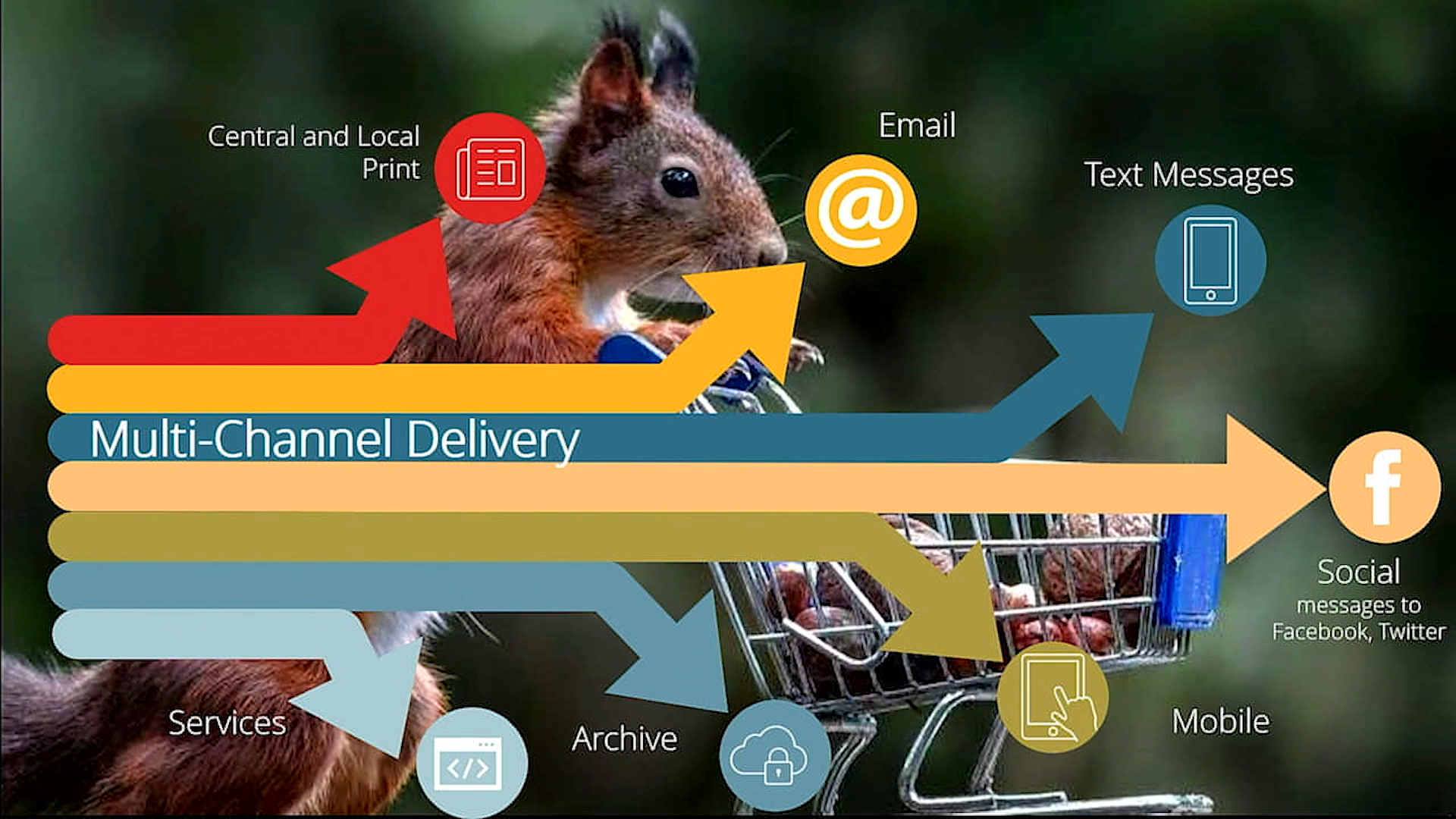
Multichannel delivery
Letter delivery options
When the user has completed the letter task it could be formatted by Papyrus Client in the browser or Desktop and locally printed/e-mailed/faxed or queued in the central Papyrus Document Pool for any further post-processing, such as the addition or Barcodes and/or OMR codes or batching letters to the same end customer.
Managing individually selected and dynamic attachments
Often there is a need to attach terms and conditions, complaints procedure, an entry form or a commercial brochure to a letter or contract. The correspondence solution supports pre-defined, manual and dynamic attachments.
With the manual option, the user can choose from a list of pre-defined attachments, whereas with the dynamic attachment the choice is being made using business rules.
The Central Business Document Pool
Papyrus integrated output management for all types of business documents generated centrally in batch/online, as well as individually by the business users, can be collected in the Document Pool for optimized print/mail and digital output delivery to desktop, browser and mobile - based on customer’s preference. The Document Pool is available on z/OS, SUN, AIX, HP, Linux and Windows.
The unique concept of document pooling replaces conventional file spooling. Bundling of documents includes index and control information and provides distribution, reprinting, OMR and barcoding, banner pages, envelope merging and splitting. The bundling, distribution and postal optimization features provide important opportunities for cost reduction, by reducing the amount of printouts and numbers of envelopes mailed and by optimizing the postage per mail piece for discount possibilities. As Papyrus has control and visibility of all resources in the system, postal sort can be applied on the formatted letter, not only on addresses.
Users may have the ability to search the Document Pool for previously sent documents for viewing, re-printing and re-sending to the end customer. Reprints can have a watermark included to indicate the document is not the original.
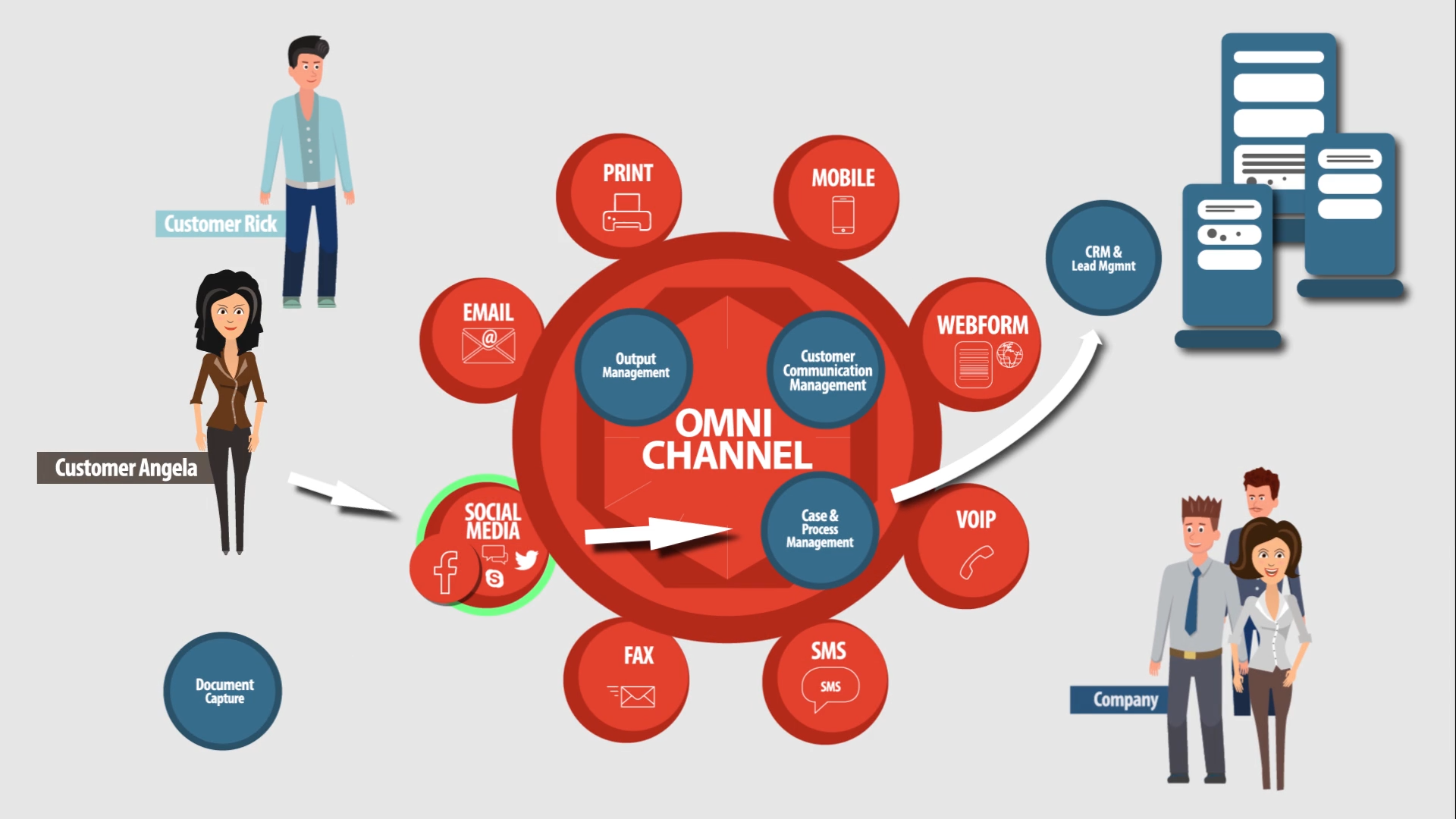
A document solution for the multichannel world
Papyrus interfaces with any input data file without data manipulation or tagging - and by single-time design and formatting, it seamlessly delivers any business document to print, to the Web and to mobile. Every document is formatted with a document index, and identical quality is guaranteed on all channels.
Papyrus' proven output management system is designed for transparent and seamless multichannel output to all destinations in the network and on the Web. Central control and administration of all jobs is performed by the Papyrus WebRepository. Powerful end-to-end monitoring and management of all jobs and across all platforms, devices and output channels is enabled by the Papyrus Automated Document Factory (AFD) framework solution.
The Papyrus ADF provides intelligent, end-to-end automation, tracking and monitoring of print and e-delivery. The ADF includes unique features for complete centralized lifecycle management - across all platforms - of all document resources from data, formatting, printing and post-processing to multichannel delivery and archiving.
Papyrus job, device and process management
From the desktop, browser or mobile, authorized users perform supervision and administration of print and e-delivery jobs by monitoring all processes running on a wide range of printers and other output channels. Agent technology is used to perform highly flexible process automation based on the document status.
Document monitoring, tracking, auditing and generating reports
The Papyrus Platform performs automating and monitoring of the entire, end-to-end document production process as a manufacturing process, from raw business data to formatting into digital documents and delivery to multiple output channels, including post-processing, bundling and enveloping control. Documents can be tracked seamlessly from creation over centralized or decentralized printing to final enveloping in the letter shop. Document templates and resources are versioned, including a full audit trail with who accessed what document, applying which changes.
Case Study
Migration to Modernize Business Correspondence for RheinLand Insurance Group
The Business
Established in 1880 RheinLand Insurance is one of the very few insurance groups today with a majority of shares privately owned. With roughly 880 employees and 350 sales representatives on a full-time basis RheinLand, its subsidiaries and a brokerage and banking division together offer a wide range of private and business insurance offerings. Cooperation partners offer insurance products for healthcare and legal costs. RheinLand Insurance services approximately 2.5 million customers with premiums of 723 million Euros. Subsidiary Credit Life in Venlo/NL provides customers in different EU countries with life and residual debt business.
The Challenge
Central production of all letter correspondence for RheinLand Insurance was on the mainframe using IBM ASF and DCF. ASF applications were used either standalone or integrated into the company's damage dialog system. On average, 300 users produced 1,300 documents per day with peaks of 2,500 - and printing was available centrally or on department printers. There was a COLD interface connected with the document management system.
A preliminary study and selection for a follow-up product was initiated in 2006 for the migration of existing letters (1,000 letters with 7,500 text blocks) with some automation. The strategic decision was to retain AFP, particularly because documents in mass printing (bills, policies) were also using the AFP architecture.
The Solution
In addition to the existing products used for batch mass production - Papyrus DocEXEC, Postprocessing/Printpool and PostCalc - RheinLand installed Papyrus WebRepository and Papyrus Clients and then completed a Proof of Concept for the new Business Correspondence system as well as a first pilot GUI in 2007 with the help of ISIS Papyrus consultants. Conversion modules were established for letter definitions and the elements saved in ASF, and the converted DCF-to-DFA code was closely reviewed to ensure the structure of the existing documents was maintained in the migration.
Business Goals
Elimination of the ASF/DCF software
Migration from mainframe to a Client-Server environment
Increased user-friendliness
Simplified document formatting and production
Retaining AFP document integrity and architecture
Functional Requirements
Migration of 1,000 documents and their 7,500 elements
Interfacing for data acquisition with different RheinLand backend systems
Usage of the XML adapter for letter production by pre-existing systems
Integration of document production into the damage dialog system (3270-emulation/Web surface)
Migrating ASF/DCF to Papyrus
The letter migration, as well as enhancement of the portal GUI and integration into other applications, took place in three phases:
Letters concerning life insurance and financial accounting
Letters concerning combined insurances
Letters concerning damage dialog system
Through this gradual introduction, RheinLand Insurance gained relevant experience with the capacity and functionality of Papyrus WebRepository that enabled them to optimize on every level for key advantages:
Achieving Corporate Identity - Proportional fonts conform now with the mass print
WYSIWYG display including overlays (up to now not possible in 3270-emulation)
Spell-checker within letter development and the entry of free text
Options for formatting within free text
"Four-eyes" principle on Web GUI without paper output
The data acquisition interface for ASF was connected and optimized with the RheinLand systems through the Papyrus interface. Furthermore, the trigger for letters, which are partly also produced in 'batch', was enabled through the Papyrus XML Adapter with the pre-existing systems.
The strong integration into the RheinLand damage dialog system (i.e., with response of the print status) made it essential to have different mechanisms to communicate via Windows between the mainframe surroundings and the ISIS Papyrus products.
RheinLand Portal and Desktop GUIs
With the Papyrus products RheinLand was able to define GUIs for business users not using a Designer workplace.
Portal applications:
Letter Portal
Change Management
Print Management (View on the Print Pool)
Desktop applications:
System Operator - Management of Queues and Tools
Web Operator - Management of the Web Server
Migrating Word templates to Papyrus
Besides switching from ASF/DCF products in 2011, the project included moving roughly 120 Word templates into the new document system called RheiKos (RheinLand System of Correspondence). These templates were established in the business departments apart from the mainframe solution. In the future, more letter templates will be developed and used through WebRepository.
The Future
Further expansion will also occur in the linkage of distribution via e-mail, fax or e-mail letter, as well as in meeting a request for a decentralized building block management in the business departments.
Papyrus Products at RheinLand
Papyrus Designer
Papyrus DocEXEC
Papyrus Client/Webportal
Papyrus WebRepository
Papyrus Postprocessing/PrintPool with PostCalc
Papyrus Server/E-mail
Papyrus Designer/FixForm
Organisation: RheinLand (Insurance)
Business Challenge: Updating and integrating centralized business correspondence system
Goals: Improved quality standard for letter production; Elimination of ASF/DCF; Migration of Word templates
Migration: z/VSE to Windows
Solution: Papyrus Correspondence Framework
A comprehensive, flexible and scalable solution for consolidated management of inbound and outbound customer communications across channels, departments and systems.
Papyrus Adaptive Process Platform
Organizations can define, measure, and manage process, content and data in complex service environments with a shared customer view and customized GUIs.
Embed outbound business communication: The use of Papyrus outbound products closes the communications loop with customers, clients, stakeholders, agents and vendors with high-quality content.
A one-system solution or just the capabilities you need